

Flow control
Docs › Flow control
Debounce
Handle a burst of updates once using its latest event.
Wait until a user stops editing a record, then process only the latest update. Each matching event restarts the quiet period for its key, so the function runs once for the burst.
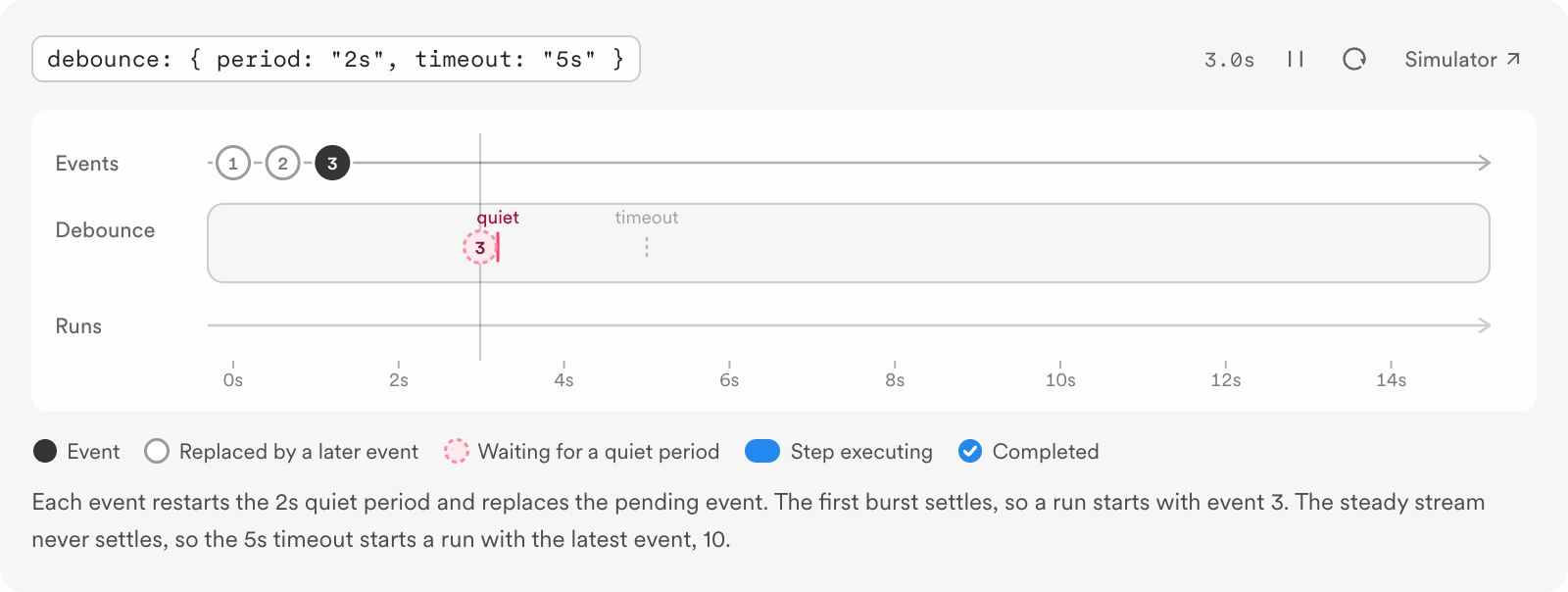
Configure a quiet period
This TypeScript v4 function waits five minutes after the most recent company/updated event for an account. Each new event for that account restarts the five-minute wait. The optional ten-minute timeout stops a continuous stream from postponing the run indefinitely.
import { Inngest } from "inngest";

const inngest = new Inngest({ id: "customer-sync" });

export const syncCompany = inngest.createFunction(
  {
    id: "sync-company",
    triggers: { event: "company/updated" },
    debounce: {
      key: "event.data.account_id",
      period: "5m",
      timeout: "10m",
    },
  },
  async ({ event, step }) => {
    await step.run("process-latest-update", async () => {
      console.log(event.data.account_id);
    });
  }
);import datetime
import inngest
inngest_client = inngest.Inngest(app_id="customer-sync")
@inngest_client.create_function(
fn_id="sync-company",
trigger=inngest.TriggerEvent(event="company/updated"),
debounce=inngest.Debounce(
key="event.data.account_id",
period=datetime.timedelta(minutes=5),
timeout=datetime.timedelta(minutes=10),
),
)
async def sync_company(ctx: inngest.Context) -> None:
async def process_latest_update() -> None:
ctx.logger.info(ctx.event.data["account_id"])
await ctx.step.run("process-latest-update", process_latest_update)import (
"context"
"log"
"net/http"
"time"
"github.com/inngest/inngestgo"
"github.com/inngest/inngestgo/step"
)
type CompanyUpdated struct {
AccountID string `json:"account_id"`
}
func main() {
client, err := inngestgo.NewClient(inngestgo.ClientOpts{AppID: "customer-sync"})
if err != nil {
panic(err)
}
_, err = inngestgo.CreateFunction(
client,
inngestgo.FunctionOpts{
ID: "sync-company",
Debounce: &inngestgo.ConfigDebounce{
Key: "event.data.account_id",
Period: 5 * time.Minute,
Timeout: inngestgo.Ptr(10 * time.Minute),
},
},
inngestgo.EventTrigger("company/updated", nil),
func(ctx context.Context, input inngestgo.Input[CompanyUpdated]) (any, error) {
_, err := step.Run(ctx, "process-latest-update", func(ctx context.Context) (any, error) {
log.Println(input.Event.Data.AccountID)
return nil, nil
})
return nil, err
},
)
if err != nil {
panic(err)
}
_ = http.ListenAndServe(":8080", client.Serve())
}Replace the step body with your application work. The handler receives the last event in the burst, not the first event and not an array of every event.
The optional key is a Common Expression Language (CEL) expression string evaluated against each event. Each unique value gets an independent debounce period. In the example, updates for two accounts can settle and run separately. Without a key, matching events share the function's debounce period.
How the wait changes
- The first matching event starts a debounce period.
- Another matching event within that period restarts the wait. The new event replaces the pending one.
- When the full period passes with no new matching event, Inngest starts one run using the last event received.
- If you set
timeout, Inngest stops extending the wait once that maximum time passes and runs with the latest event. The next matching event starts a new debounce period.
Choose the right behavior
Need | Use | Which event runs? |
|---|---|---|
Wait for updates to stop, then use the latest state | Debounce | The last event in the burst |
Start work when an event arrives and skip events beyond a limit | An event admitted under the limit |
Debounce delays the run. Rate limiting does not wait for a quiet period. If you need to process every event, neither behavior fits; consider Throttling, which queues excess runs.
Configuration and limits
Option | Meaning |
|---|---|
| Required quiet period. TypeScript v4 permits |
| Optional CEL expression that creates a separate debounce period per value. |
| Optional maximum time that incoming events can keep extending the wait. |
Debounce cannot be combined with batching. Debounce keeps one latest event; batching collects multiple events for one run.
Updated Nov 10, 2026
Powered byZunoy